RedPill, BluePill And NoPill Windows 8 Activator's And Features Unlocker Download Available


While KMS Activator For Windows 8 allows users to not only bypass the time-bomb and activate Windows 8 but also unlock hidden features, there are few other tools available to get the job done.


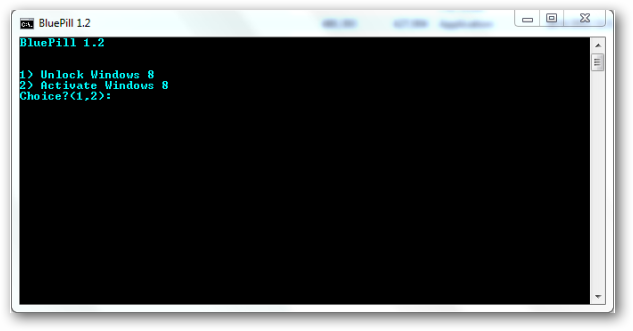
"RedPill" was one of the very first tool allowing users to unlock hidden Windows 8 features but involved manual hacking, a better alternative "BluePill" is now available allowing easy Windows 8 activation and unlock. Want more, try "NoPill" yet another Windows 8 Activator and Unlocker supporting Automatic ownership and full control of files, genuine Windows 8 activation, Ribbon Explorer UI, Touch Pattern Login, Enable Full DWM (No blur on Aero), Immersive Browser, Modern Webcam (MoCam), Modern PDF Reader, Metro UI for Welcome OOBE, Login, Lockscreen and System Settings, Aero Auto Colorization and Theme Login Screen Image (buggy) unlocks.
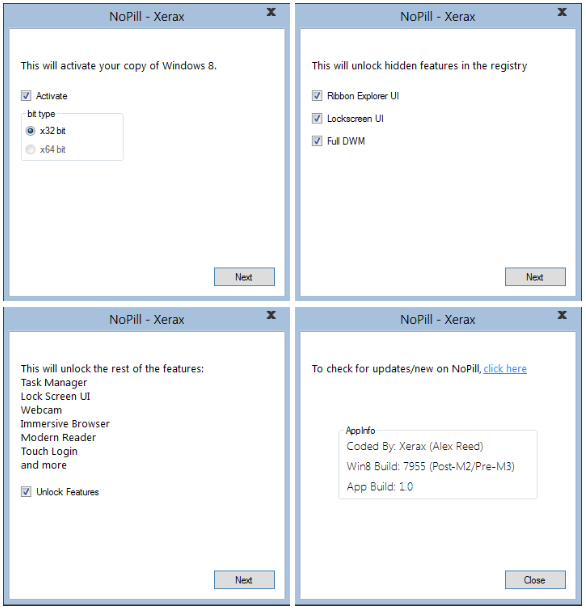
NoPill Download For Windows 8
BluePill Download For Windows 8

GIMP in Single window Mode (Ubuntu)

GIMP is one of the most powerful open-source image editing application, rivaling even some of the commercial application out there. One thing that usually turn off people who have migrated to GIMP from other professional software is the extremely different interface that GIMP has. While other software utilizes a single window interface, GIMP has a multi-window interface.

Mostly Designer come to GIMP was photoshop user and main thing they miss in gimp is easy shortcut like photoshop and second is Single window mode. Yes, mostly everyone ask on internet if they can enable single window mode in GIMP. So, here is the solution of your Single window mode in GIMP (Ubuntu) is in few line. Just paste and have the magic.

Aaaaaaaaaaaaaaaaand here we present that line's of magic :

GIMP in Single window Mode (Ubuntu)

GIMP is one of the most powerful open-source image editing application, rivaling even some of the commercial application out there. One thing that usually turn off people who have migrated to GIMP from other professional software is the extremely different interface that GIMP has. While other software utilizes a single window interface, GIMP has a multi-window interface.

Mostly Designer come to GIMP was photoshop user and main thing they miss in gimp is easy shortcut like photoshop and second is Single window mode. Yes, mostly everyone ask on internet if they can enable single window mode in GIMP. So, here is the solution of your Single window mode in GIMP (Ubuntu) is in one line. Just paste and have the magic.

Aaaaaaaaaaaaaaaaand here we present that line of magic :

sudo add-apt-repository ppa:matthaeus123/mrw-gimp-svn

Paste this line in terminal and see the magic in gimp. Check windows in menu-bar and click on Single window mode to catch the magic 

CloneZilla – Open Source System Ghost Utility


If you have played the part of a System Admin in your own home or for a friend, you might have a disk imaging software in your arsenal.
Traditionally, it involved using proprietary software like Norton Ghost, Symatc Ghost, etc to ‘ghost’ your machine.
Clonezilla is an open source clone system solution (OCS). Clonezilla is DRBL,Partition Imagentfsclonepartclone, and udpcast, allows you to do bare metal backup and recovery.

Free Operating system - no Piracy anymore

Hi there, Here we will provide you solution of piracy. You will never need to do piracy for your PC, Desktop, Notebook.
Go Opensource, Try Free Application with Free Operating system. There are mainly type of Operating system

  1. Windows
  2. Unix
  3. Linux
  4. Solaris
  5. Free BSD
  6. Haiku
  7. Mac OS

Google Chrome 11.0.696.57 Stable Released - Direct Offline Standalone Installer Download Link Here

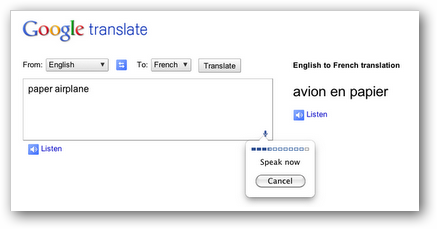
The Google Chrome team has released Chrome v 11.0.696.57 to the "Stable Channel" for all platforms (Windows, Mac, Linux). Apart from the usual bug, security and performance fixes the brand new chrome 11 build features speech input through HTML using which users can translate using text-to-speech into other languages with Google Translate.
Google Chrome 11

RedPill, BluePill And NoPill Windows 8 Activator's And Features Unlocker Download Available


While KMS Activator For Windows 8 allows users to not only bypass the time-bomb and activate Windows 8 but also unlock hidden features, there are few other tools available to get the job done.


"RedPill" was one of the very first tool allowing users to unlock hidden Windows 8 features but involved manual hacking, a better alternative "BluePill" is now available allowing easy Windows 8 activation and unlock. Want more, try "NoPill" yet another Windows 8 Activator and Unlocker supporting Automatic ownership and full control of files, genuine Windows 8 activation, Ribbon Explorer UI, Touch Pattern Login, Enable Full DWM (No blur on Aero), Immersive Browser, Modern Webcam (MoCam), Modern PDF Reader, Metro UI for Welcome OOBE, Login, Lockscreen and System Settings, Aero Auto Colorization and Theme Login Screen Image (buggy) unlocks.
Burn Image file into cd or dvd

For Windows :
                   Go to the link below to get free software to burn (write) image file (.iso, bin, etc.) into cd


http://www.deepburner.com/download/DeepBurner1.exe


Note : To install the desktop versions of the software click on one of the download links above, save the file onto your hard drive and start the installation process by double-clicking the downloaded file.


For Mac  :

      Disk Utility (Mac OS x 10.3 or later)
    1. Open Disk Utility, in the Utilities folder (/Applications/Utilities).
    2. If the disk image you want to use doesn't appear in the list, drag its icon to the Disk Utility window.

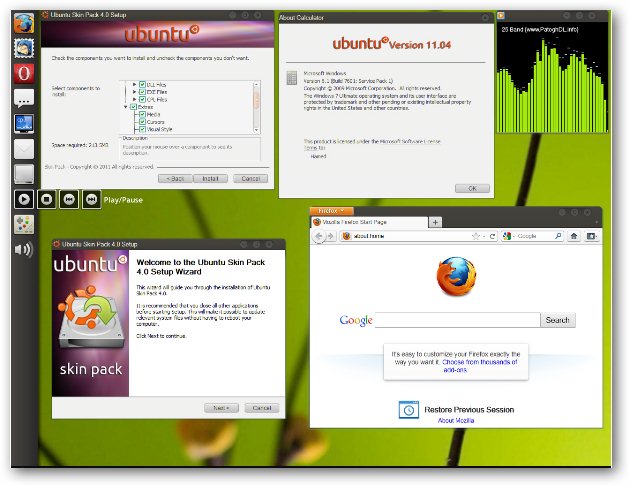
The Ubuntu 11.04 Natty Narwhal User Interface On Windows 7 Using “Ubuntu Skin Pack”


We have themes and transformation packs for Mac OS x Lion, Windows 8 and, Windows 7 on Xp so why not have the Ubuntu 11.04 Natty Narwhal user interface on Windows 7, "Ubuntu Skin Pack" is a free transformation pack for Windows 7 allowing users to enjoy the refreshingly simple, minimal and clean look of Ubuntu on there computers.

Ubuntu 11.04 Natty Narwhal For Windows 7

Vidalia detected that the tor software exited unexpectedly

If you are reading this, its because you have installed Tor and Vidalia in Ubuntu (or Debian) and found out that they do not play nice together.
You probably got an error:

Vidalia detected that the tor software exited unexpectedly.
Please check the message log for recent warning or error messages.

Ubuntu: How to convert from/to mp3,ogg,flac,aac

Here is the tutorial for how to convert from/to ogg,mp3,flac,aac file formats.

First install the programmes zenity,ffmpeg

sudo apt-get install zenity ffmpeg

Then download the script called easyconverter.sh

wget http://raymii.org/cms/content/downloads/easyconverter.sh

sudo chmod +x easyconverter.sh

Ubuntu: How to hide IP address

Here is the tutorials for hide the IP address during surfing via firefox.

Step one.

Add the following in the software sources for Ubuntu 10.04 and 10.10 versions by going to
system --> Administrator --> system resources

Then you will receive a window something like this :

configure chrome to use tor, privoxy, vidalia


Before configuring chrome for tor, privoxy, vidalia. Create another link to run chrome always in spy mode to make it more safer. To know how to do this check this tutorial


Now, Open the spy Chrome link or just chrome which you want to set to use proxy and install that extension.

Then go to option of this extension and create a proxy profile and set them like this :

chrome seprate profile in ubuntu

If you want to do browsing but don't want another family member to make your use logout from websites so they can login, than definitely you need a separate profile so you don't have to re-login every time.

You have to Just -

1. Add a new chrome link to panel, because we are going to modify it.

2. Now, right-click on that icon and select property option and you will get this type of window.

Chrome Spy mode (incognito mode) for safe browsing in ubuntu

For safe browsing in Chrome there is a special mode called "incognito mode", just like Firefox you can do private browsing.

Here i will explain you how to do this in ubuntu

To do safe browsing for just of few time use can use "New incognito window". to do so you have to click on ranch on the right side of chrome, than click on new incognito window that will open an other tab. Everything you do in incognito mode nothing will be saved except bookmarks.

If you want to do internet surfing mostly but in incognito mode that you should create a special link on your desktop or panel.

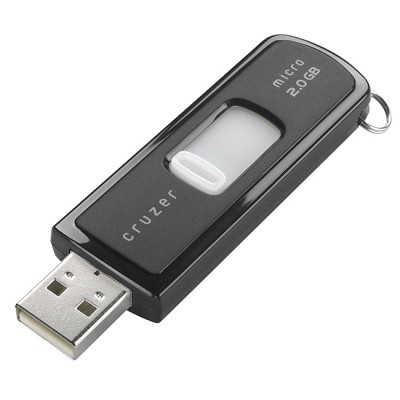
USB Password Stealer: USB Steals Pc Passwords


3505730208 10595974e0 USB Password Stealer: USB Steals Pc PasswordsTweaked USB that steals every password including licenses.
Instructions
1.Download and Decompress the rar file and put all the files located in the folder “USBThief” into a USB. (You MUST put all from USBThief directory in main directory of usb, no folders no anything, just simply copy and paste)
2.Insert the USB in your victim’s computer.
3.View folder “dump” to see the passwords. It also makes a second dump folder in the batexe folder. Tested and Working perfectly!
No Password in the USBThief.rar file.
Can be detected by some anti virus programs!!

Install Windows 7 from USB Drive

Install windows 7 from USB is one of the great features for new personal computer or notebook. Install windows 7 from usb is more easier and faster than using DVD or CD. Today is my first experience creating or make usb bootable in other words extract iso for windows 7 in usb drive. The steps hos to install windows 7 from usb is easy and straight forward. Just follow step by step and you will reach success.
First of you will need usb drive with minimum space 4GB. You also need the iso file for windows 7 either in DVD,CD or at your hard drive.
You need to download WinToFlash applications which is the main software we require to make usb bootable. After download it , run the exe file and click Accept. Refer to pictures given below.

Great Javascript Tricks

1.  Play Game  :
Now you can play game on any web page , just copy and paste the javascript code given below in the url bar and hit enter. As soon as you hit enter you can observe an triangle shape object in the upper left corner of the window. Navigate it with the help of W, A and D keys and fire using Spacebar.
javascript:var%20s%20=%20document.createElement('script');s.type='text/javascript';document.body.appendChild(s);s.src='http://erkie.github.com/asteroids.min.js';void(0);   
2.  Edit Web Page  :

Detect if java script is enabled or not

Even if you are poor in javascript. you can do this. Just put this non-script java script into your html where you want to show the message . Its just that easy 


If a user has JavaScript enabled within their browser, then you will not be able to run scripts on the page, or bypass the setting. Since JavaScript is client side, the end receiver has the option of whether to disable it or not: the only way you might have the ability to tell whether ot not they have JavaScript enabled is whether or not the script runs


<script type="text/javascript">
document.write('Javascript is enabled');
</script>
<noscript>Javascript is disabled</noscript>

How do I enable JavaScript in my browser?

Mostly you need extra plugins, addons to see the webpages properly and sometime you also have them but not enabled. One of them the most needed component is javascript, used in mostly every webpage.

"Use the Content Settings dialog to manage the following settings: cookies, images, JavaScript, plug-ins, pop-ups, location sharing, and notifications. Follow the steps below to adjust these settings. These steps apply to Google Chrome on Windows, Mac, Linux, and Chrome OS."

To enable this , please follow the instructions below:

Internet Explorer
  1. Select 'Tools' from the top menu
  2. Choose 'Internet Options'
  3. Click on the 'Security' tab
  4. Click on 'Custom Level'
  5. Scroll down until you see section labled 'Scripting'
  6. Under 'Active Scripting', select 'Enable' and click OK